Building blocks and concepts
How it works
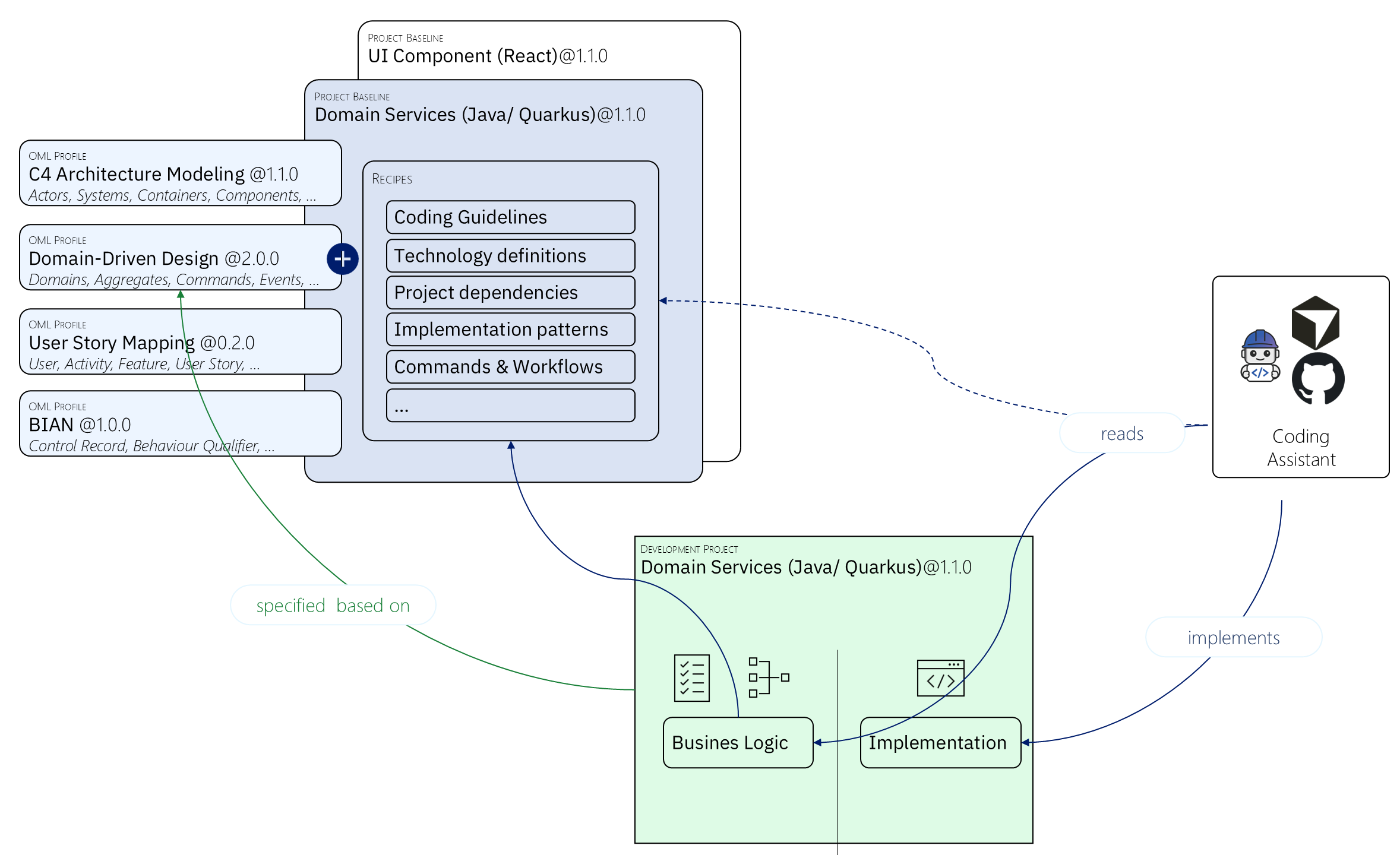
The workbench enables design-driven development through an integrated workflow that transforms architectural intent into machine-readable specifications and powers AI-assisted delivery, by utilizing a fully customizable model, workflow, and transformation via skills. The diagram below illustrates this end-to-end process:
Building Blocks
The workbench is built on several key components that work together to enable design-driven development:
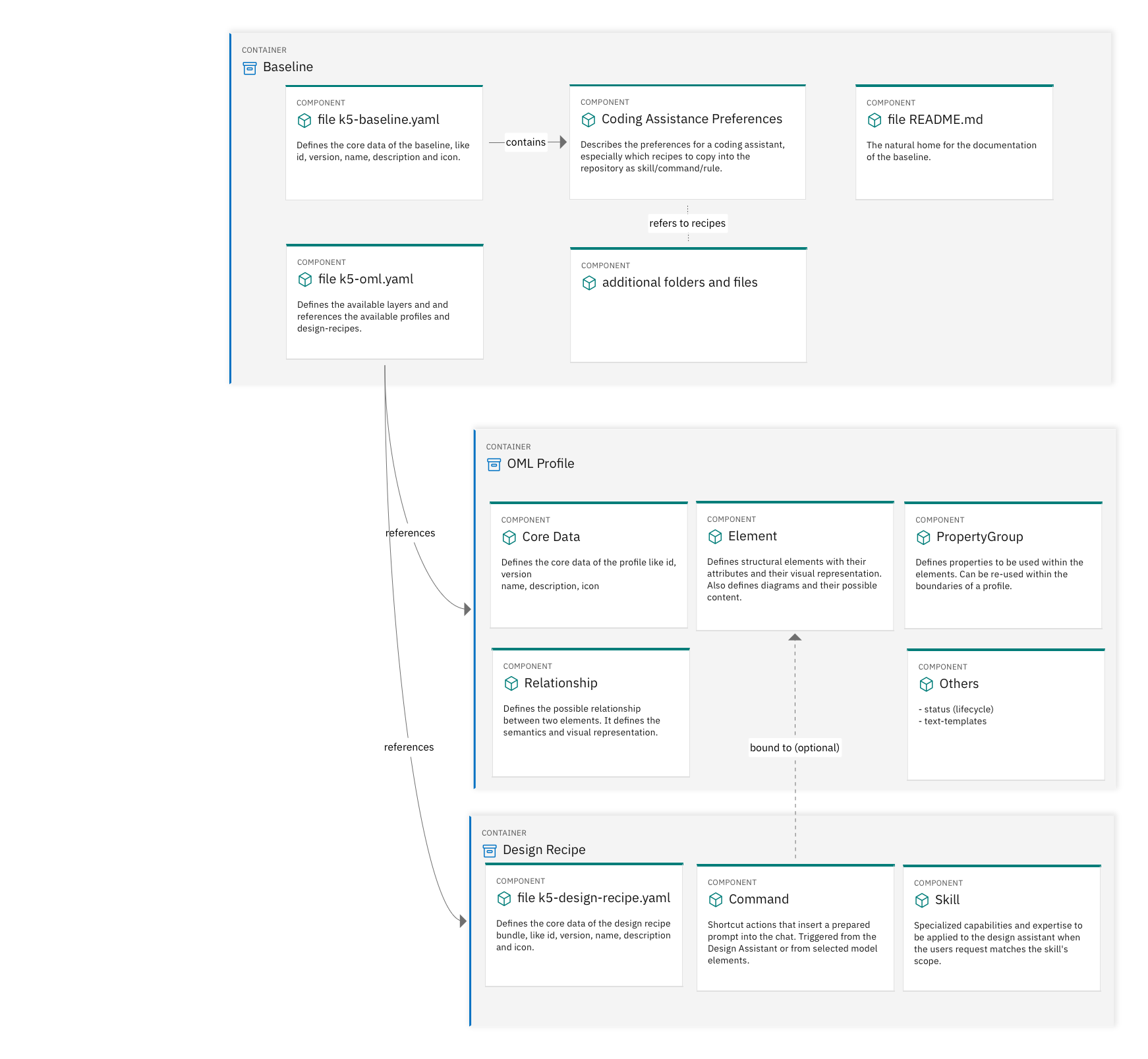
Open Modeling Language (OML)
The modeling vocabulary that defines what can be modeled in projects. OML uses modeling configurations composed of versioned, shareable OML profiles.
OML Profiles
Cohesive sets of vocabulary for specific concerns or domains (e.g., C4, DDD, Event Storming). Each OML profile defines element types, relationship types, and properties.
Project Baselines
Comprehensive configuration packages that define the complete modeling environment for projects, including OML configurations, system definitions, Coding Assistant recipes, and documentation.
Design Recipes
Design Recipes bundle skills (specialized expertise you give the Design Assistant, in the same spirit as skills in other AI agents) and commands (shortcuts into the chat) that reflect your terminology, workflow, and typical design tasks. Teams attach recipes to project baselines; individuals can also upload personal recipes that apply for them on every query, independent of the baseline.
Coding Assistant Recipes
Implementation guidance including coding guidelines, technology definitions, implementation patterns, commands, and workflows. Recipes are committed to Git repositories and picked up by coding assistants as skills, commands, and rules.
Customization
Organizations can create custom OML profiles, project baselines, and Coding Assistant recipes tailored to their specific needs, standards, and technology choices.
The Workflow
OML Profiles
Multiple modeling OML profiles define the vocabulary for different concerns, e.g.:
- C4 Architecture Modeling (@1.1.0): Actors, Systems, Containers, Components
- Domain-Driven Design (@2.0.0): Domains, Aggregates, Commands, Events
- User Story Mapping (@0.2.0): User Activity, Feature, User Story
- BIAN (@1.0.0): Control Record, Behaviour Qualifier
Each profile is versioned independently and provides specific element types and relationships for its domain.
Project Baseline (Configuration Package)
The project baseline packages everything needed for implementation, e.g.:
- Project Baseline: Domain Services (Java/Quarkus) @1.1.0
- UI Component (React) @1.1.0
The baseline includes Coding Assistant recipes that guide implementation:
- Coding Guidelines
- Technology definitions
- Project dependencies
- Implementation patterns
- Commands & Workflows
These recipes are "specified based on" the OML profiles, ensuring implementation aligns with design vocabulary.
Coding Assistant (AI-Powered Implementation)
The Coding Assistant reads the Coding Assistant recipes and uses them to generate implementation. The assistant has access to:
- All design specifications from the OML profiles
- Implementation guidance from the recipes
- Project-specific patterns and standards
Development Project (Generated Code)
The development project (Domain Services Java/Quarkus @1.1.0) contains:
- Business Logic: Generated from domain models and specifications
- Implementation: Code that reflects the architectural decisions and patterns
The coding assistant "implements" the code based on the complete context provided by profiles, baselines, and recipes.
This creates a continuous flow from architectural intent (profiles) through structured guidance (baselines and recipes) to working code (implementation), with AI coding assistants bridging the gap between design and delivery.